Your stream, your people, one place.
VIBES is a free, ad-free social platform built around live streaming. Go live and multistream to Twitch and Kick, post clips and reels, message with end-to-end encryption, and make music, draw and play games with your community.
Why communities stay
Multistream gets a creator onto VIBES without leaving Twitch or Kick. The reason their community stays is what the big platforms do not have in one place: viewers level up on the channels they watch, draw together on the stream, message each other privately, play games and make music in the same chats, and follow the creator's reels, posts and stories between streams.
01/11
Go live
For the creator who already streams somewhere and does not want to start again from zero.
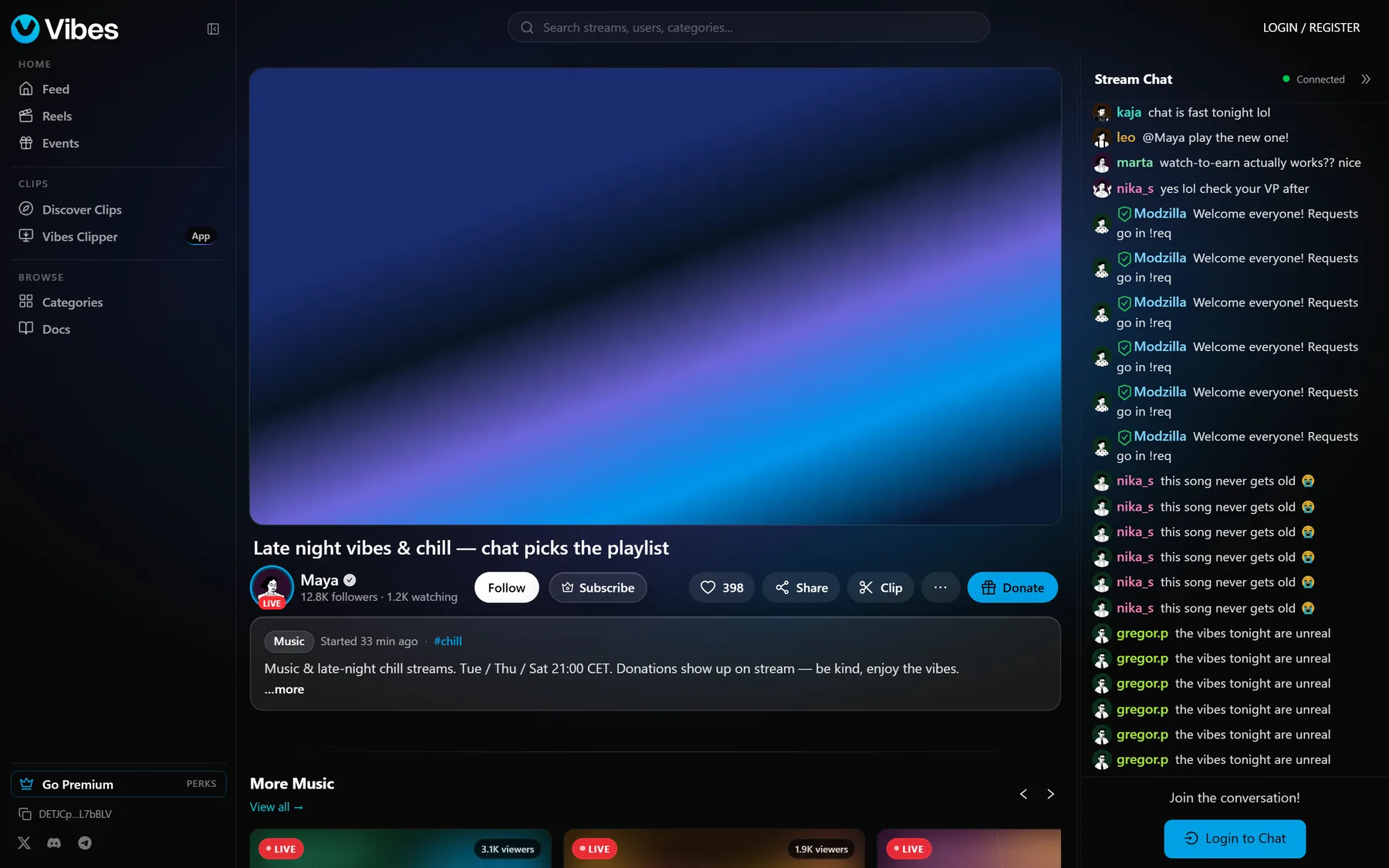
Stream from OBS or any RTMP encoder
Paste a stream key into OBS Studio, Streamlabs, XSplit or a mobile encoder. With auto go-live, starting OBS is enough. No application, no follower minimum.
Open →Built-in multistream
One feed goes to VIBES and is mirrored to Twitch, Kick, YouTube, X and TikTok at the same time, or to any platform that gives you an RTMP address, with no extra upload or GPU load and no restream subscription.
Open →Your Twitch and Kick chat on VIBES
The chat bridge brings the chat you already have into one feed, with Twitch and Kick badges, name colours and emotes, so a new channel is never an empty room.
Open →Low-latency player
Live video starts a few seconds behind real time on the web, with adaptive quality, a mini player and picture-in-picture.
Who is in the room
See your viewers from VIBES, Twitch and Kick in one list, with lurkers and mods, while you are live.
Replays
Streams are saved as replays. A storage bar shows what you use, and you pin the replays you want to keep.
Go live from your phone
Start a stream from the VIBES app. It keeps going in picture-in-picture and reconnects by itself on a bad signal.
StreamX: guests on stream
Bring other people into your stream as guests, in the browser.
Open →Raids
When a stream ends, viewers are sent to another live channel with a countdown, and the raided streamer sees how many are coming.
03/11
Private messages, end-to-end encrypted
For talking to your mods, your friends and your community without leaving the platform, and without anyone reading along.
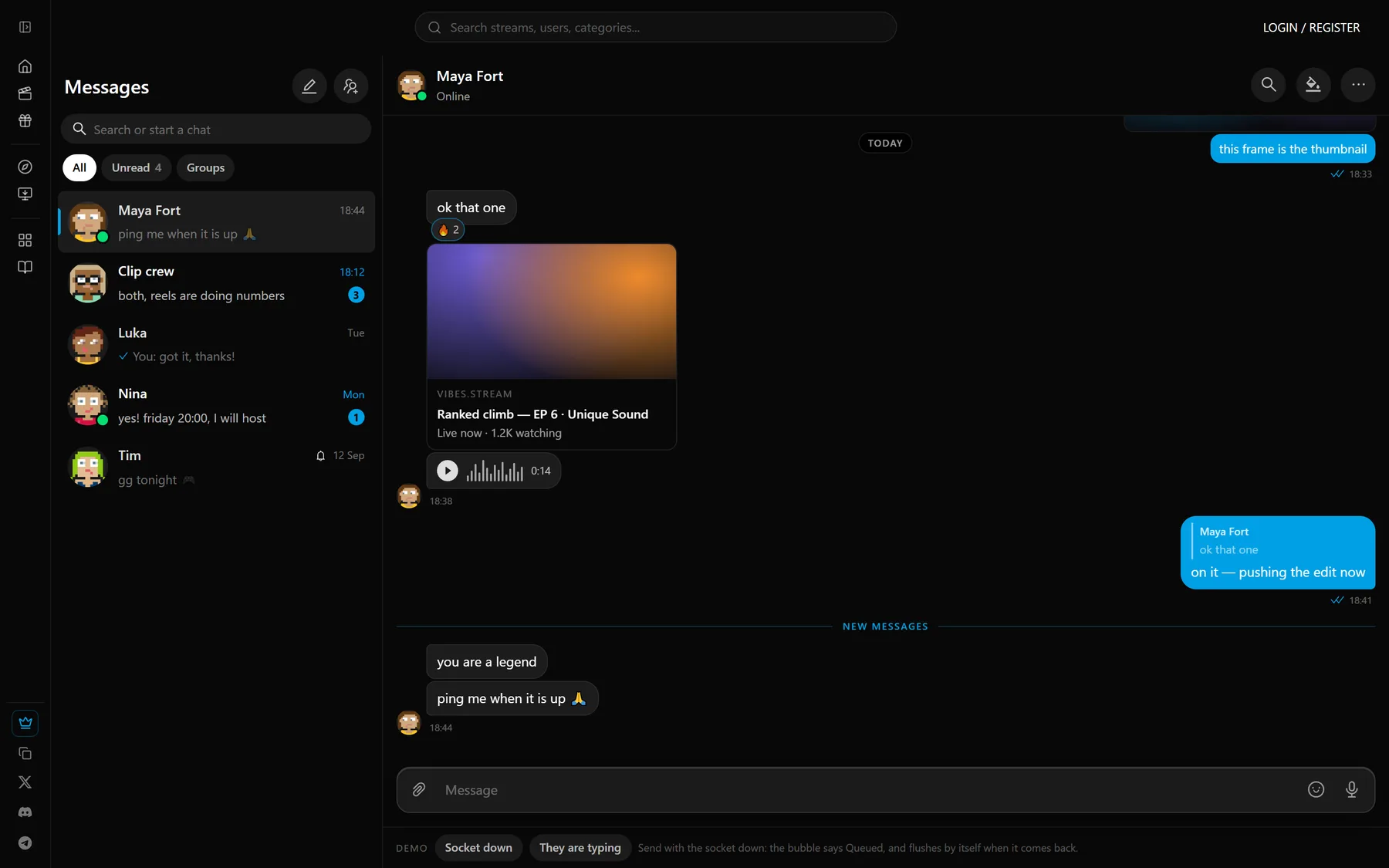
End-to-end encrypted messages
Direct messages are encrypted on your device, on the web and in the app. Only you and the person you are talking to can read them. Private messages are not scanned.
Everything a messenger has
Group chats, voice and video messages, view-once photos, replies, reactions, read receipts, search, a shared media tab, wallpapers and themes.
Files up to 10 GB
Send large files from the app. They keep sending in the background and resume after a drop, encrypted like everything else.
Share anything into a chat
Clips, reels, posts and songs open and play right inside the conversation.
04/11
Things to do together: games and drawing
For communities that want to do something with each other, not only watch.
Games in DMs and group chats
Start a game in any chat: Guess the Flag for up to 16 players and Texas Hold'em poker with bots, with rematches and joining a game that is already running. Free to play, for fun, with no real money.
Draw board in DMs
A shared painting app inside a chat: brushes, up to 100 layers, smudge, shapes and mirror drawing, export up to 4K, and a timelapse video of the drawing. The board is end-to-end encrypted too.
Draw Together on stream
Viewers draw one picture or a flipbook with the streamer, up to 50 at a time. The streamer approves what reaches the stream from a mod console, and the result exports as an image, a timelapse or a video.
Make your own game
The VIBES Game SDK lets anyone build a game for VIBES chats. After review it is live for everyone.
Open →05/11
Make and share music
For the creator who makes their own sound, alone or with friends.
VIBES Jam: make music together
A music studio inside any direct message or group chat, in the browser and in the app: song view, piano roll, channel rack and mixer. Everyone in the chat works on the same project.
VIBES Synth
A synthesizer with 185 factory sounds, filters, LFOs, automation and wavetables made from your own audio.
Record vocals, with autotune and effects
Record takes that land on the beat, remove noise, and use VIBES Tune for real-time autotune. Effects come as their own plugins: EQ, multiband, distortion and reverb.
Play it like an instrument
Play from your computer keyboard or plug in a MIDI keyboard. Jam measures the delay of your sound card so recordings line up.
Share and sell your sounds
Share sounds and presets into a chat so friends can use them, or sell a pack of your own sounds in the pack market.
Songs
Post your own track as a song. It gets its own page and a listen count, other people can put it under their reels, and you are told when they do. VIBES recognises your song inside other uploads and credits you.
06/11
Vibes Clipper
A free desktop app for Windows that records your screen in the background, so the moment is already saved when you press the hotkey.
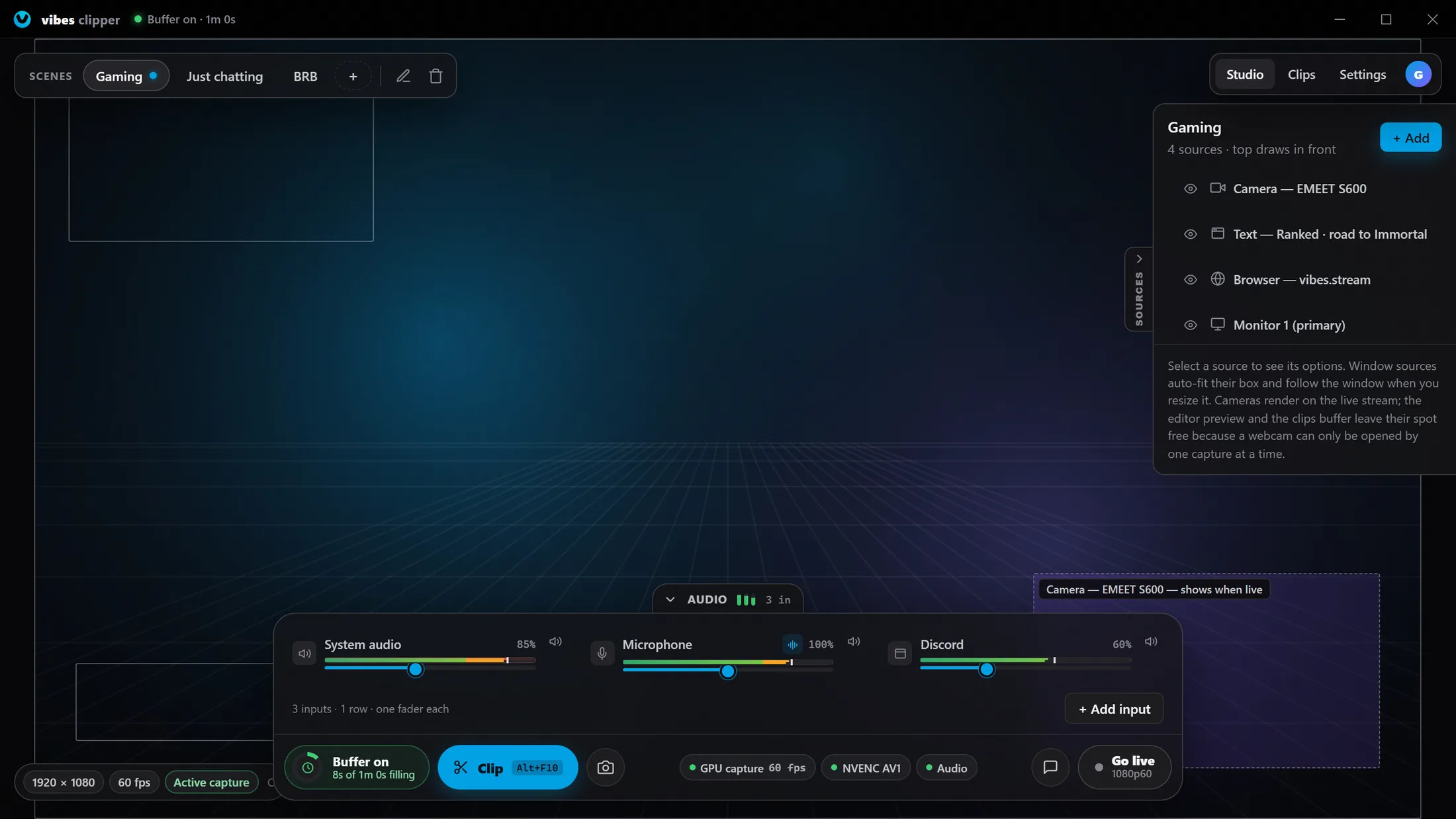
Replay buffer with one hotkey
The last 15 seconds to 5 minutes of your screen are always in memory. One global hotkey saves them as a clip, with the game still in focus, even when you are not live.
Open →Scenes, sources and a mixer
Game, camera, browser and text layers in scenes you switch between, ready-made scene presets, and a fader per input: system sound, microphone and each app on its own.
Open →Go live from Clipper
Stream to VIBES with the capture you already set up. The stream has its own frame rate and restarts by itself if video stops going out.
Open →Knows what you are playing
Clipper detects the game and sets your stream category for you. If you turn it on, your profile shows what you are playing.
AV1 and H.264 on your graphics card
Modern cards record in AV1 for the same quality in a smaller file, with H.264 everywhere else. Clips are saved to your computer; turn on auto-upload and they also go to your VIBES profile.
Screenshots, recordings and chat in the dock
A separate screenshot hotkey, a record button for longer videos, and your stream chat with replies inside the app.
07/11
Tools for your stream
For the creator who wants chat, alerts and moderation without five third-party services.
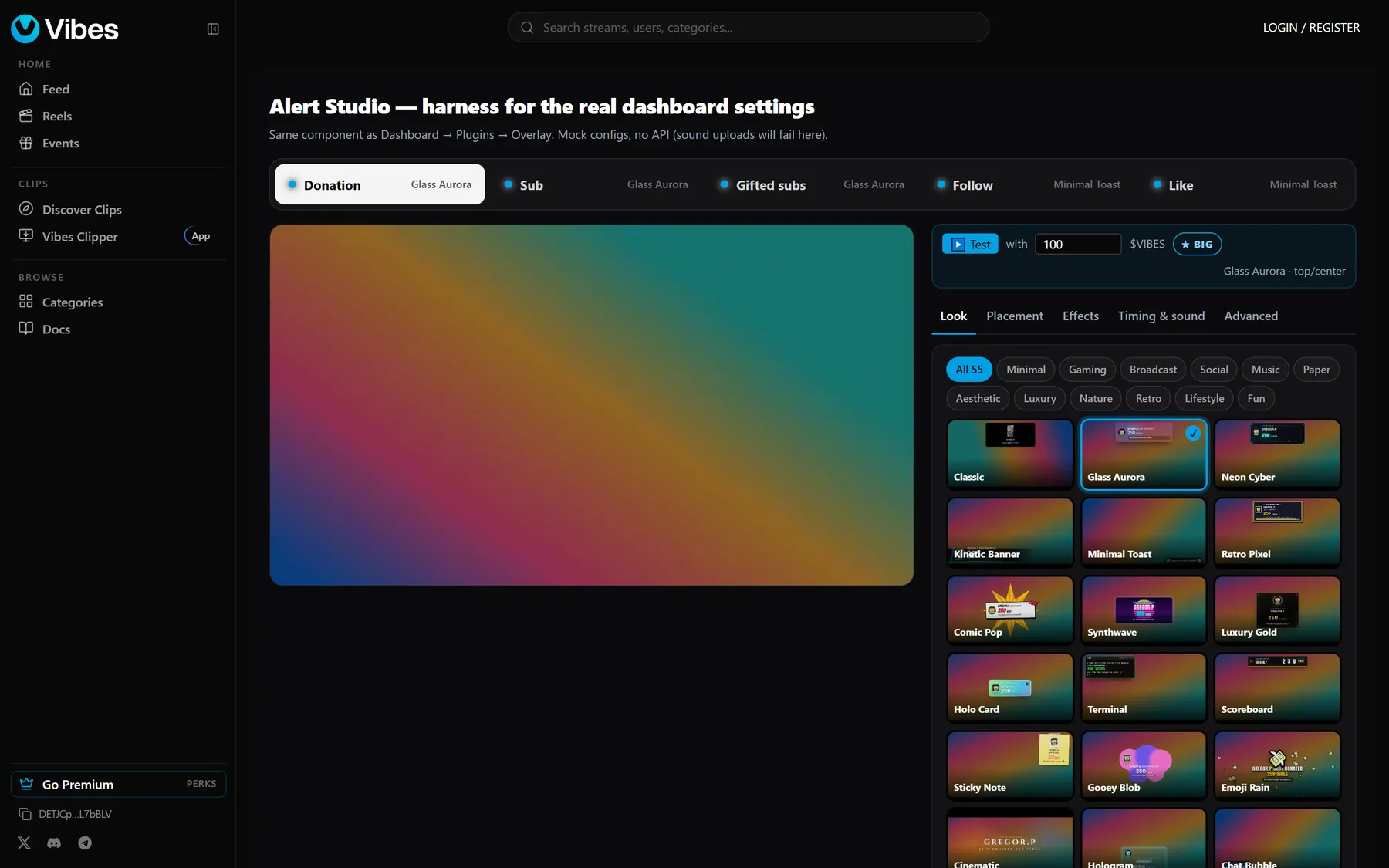
Live chat with 7TV emotes
Chat modes, channel emotes, 7TV emotes, badges, and moderators with timeouts, bans and a chat log.
Open →AI chat moderator
An optional moderation plugin that filters chat for you, with rules you set.
Open →Alerts and overlays
Follow, tip and subscription alerts for OBS, built in Alert Studio with dozens of looks. No separate overlay service.
Open →Chat overlay
A free plugin that shows your chat on stream, in 32 styles with a live editor, including Twitch and Kick badges.
Giveaway tools and bots
A spin wheel and a case draw for giveaways, and chat bots you add to your stream from the app directory.
Open →AI co-host (in testing)
A stream buddy on your overlay that talks along with your stream and reacts to clips your viewers suggest.
08/11
Your audience and your profile
For knowing who watches, and giving them a reason to come back.
Creator analytics
For every reel: where viewers leave, where they came from and who they are. For your profile: visits and which post earned each follow. Plus a grid of when your followers are online and the best time to go live.
Viewer levels
Viewers collect XP while they watch and chat: ranks, quests, streaks and badges that the whole chat can see.
A profile that is yours
Themes, name styles, animated banners with characters and scenes, country flags and a schedule.
Frame shop
More than 100 animated frames for your stream card and avatar, a new set every week, a wishlist, and frames you can gift to someone else.
Open →09/11
Earn
For the creator who wants support from viewers to arrive without a platform taking half.
Tips
Viewers tip during a stream and the alert shows on screen. Tips are sent from a wallet in SOL or a stablecoin such as USDC. The creator receives 97% directly in the same transaction; VIBES keeps 3%.
Open →Channel subscriptions
Viewers subscribe to a channel for subscriber badges and emotes. The creator sets the price and keeps 90%; VIBES keeps 10%. Prepaid, with no automatic renewal.
Open →Sell your sounds
Sell packs of your own sounds and presets to other musicians in the Jam pack market.
Founding streamers
A small, hand-picked programme: €30 a month plus a bonus for every new viewer who stays, homepage features and free Premium. No exclusivity, one-month trial.
Open →10/11
Account and safety
For keeping your account, and your community, safe.
Two-factor sign-in (2FA)
Protect your account with an authenticator app. You get backup codes, and there is a recovery path if you lose your phone.
Sign in with a QR code
On a new computer, scan the QR code on the sign-in screen with the VIBES app. No password typed, nothing to leak on stream.
Approve sign-ins on your phone
A new sign-in asks your phone first: match the number on screen and confirm with Face ID or your fingerprint.
Your devices
See every device you are signed in on, sign out one of them or all the others, and get an alert when a new device signs in.
A wallet only you control
If you use the built-in wallet, you sign every transaction on your own device. Its key is backed up, so reinstalling the app cannot lock you out.
Made for streaming
Your email is masked in settings until you press Show, so it cannot leak on stream.
Report, block and moderation
Report and block from anywhere, including messages. Public uploads are checked against known flagged media.
Open →Mobile apps and five languages
The whole site works in a phone browser. Android and iOS apps exist but are not publicly listed in the app stores right now. VIBES is available in English, Spanish, Portuguese, Turkish and Slovenian.
11/11
Build on it
For developers, bot makers and game makers.
Price
Free to stream and to watch
Free
$0
Watch, chat, stream, multistream, clip and post. 5 GB of clips, replays kept for 3 days.
Premium
$4.99 / month
Profile looks, badges, emotes and XP boosts, 25 GB of clips and 100 GB of replays.
Premium+
$9.99 / month
Everything in Premium, 100 GB of clips and 250 GB of replays.
Premium is optional and is never needed to go live or to earn. It is prepaid for the period you pick and does not renew by itself. On the web it is paid in SOL at the day's exchange rate. The mobile app, which is in testing and not listed in the stores yet, also takes App Store and Google Play payments. See Premium
Questions
What people ask first
What is vibes.stream?
VIBES (vibes.stream) is a social platform built around live streaming, made for small and growing creators and their communities. A creator goes live from OBS, multistreams to Twitch, Kick, YouTube, X and TikTok at the same time and brings their Twitch and Kick chat along. What stays on VIBES is everything around the stream: clips, reels, posts and stories, end-to-end encrypted messages and group chats, games to play in a chat, a shared drawing board, and VIBES Jam, a music studio where friends make songs together. Vibes Clipper, a free Windows app, saves the last minutes of your screen with one hotkey. Watching and streaming are free and there are no ads.
Who is VIBES for?
Small and growing streamers who want to be found, and the communities around them. Creators can add it next to Twitch or Kick without leaving: multistream keeps them live everywhere and the chat bridge brings their existing chat along.
Is VIBES just another place to multistream to?
Multistream gets a creator onto VIBES without leaving Twitch or Kick. The reason their community stays is what the big platforms do not have in one place: viewers level up on the channels they watch, draw together on the stream, message each other privately, play games and make music in the same chats, and follow the creator's reels, posts and stories between streams.
Is VIBES a social network?
Yes. Next to live streams it has a feed of clips, reels, posts and stories, follows and friends, end-to-end encrypted direct messages and group chats, games you play inside a chat, a shared drawing board and a music studio. Many people use it without ever going live.
Is VIBES free?
Yes. Creating an account, watching and streaming are free, and there are no ads. Premium ($4.99 a month) and Premium+ ($9.99 a month) are optional memberships for profile perks and more clip and replay storage.
Do I have to leave Twitch or Kick?
No. There is no exclusivity. Multistream is built in, so one stream goes to VIBES, Twitch, Kick, YouTube, X and TikTok at the same time.
How is VIBES different from Twitch, Kick or YouTube Live?
Those are video platforms; VIBES is a social platform with live video in the middle. The stream, the clips and reels, the posts and stories, encrypted messages, games, drawing and music-making share one account and one community, instead of being spread over Twitch, Discord, Instagram and a clip tool. Discovery keeps a slot for small channels and there are no ads before a stream. The honest trade-off is audience size: VIBES is much smaller, which is why creators usually start by adding it next to the platform they already use.
Is VIBES a crypto project? Do I need crypto?
No. VIBES is a streaming platform. You sign up with an email, and watching, chatting, streaming, clipping and posting never involve a wallet or a token. Money features (tips, channel subscriptions, the frame shop and the optional Premium membership) are paid from a wallet in SOL on the web, and the mobile app also takes App Store and Google Play payments. Nothing on VIBES needs you to hold a token.
Did VIBES have a token?
Yes, and it no longer plays a part. VIBES started in late 2024 around a community token on Solana, and for a time creators could launch their own tokens and a subscription bought tokens. That has ended: since 30 October 2026 a subscription pays the creator directly, and in November 2026 the token pages on the website were closed. The early community token still exists on Solana, but VIBES does not sell it and no feature needs it. VIBES makes money from the optional Premium membership and from a small fee on tips and subscriptions.
How do creators earn on VIBES?
From their viewers: tips during a stream (the creator keeps 97%) and channel subscriptions (the creator keeps 90%). A small number of founding streamers are also paid directly by VIBES (€30 a month plus a bonus for new viewers who stay).
Can I make music on VIBES?
Yes. VIBES Jam is a music studio inside any direct message or group chat: a song view, piano roll, mixer, the VIBES Synth with 185 sounds, vocal recording with autotune, and MIDI keyboard support. Everyone in the chat works on the same project. You can also post finished tracks as songs that other people use in their reels.
Are messages on VIBES private?
Direct messages are end-to-end encrypted on the web and in the app: they are encrypted on your device and only you and the person you are talking to can read them. The shared drawing board in a chat is encrypted the same way. Private messages are not scanned.
Are there games on VIBES?
Yes. In any direct message or group chat you can start a game: Guess the Flag for up to 16 players and Texas Hold'em poker with bots. They are free and played for fun, with no real money. Developers can publish their own games with the VIBES Game SDK.
What is Vibes Clipper?
A free desktop app for Windows. It keeps the last 15 seconds to 5 minutes of your screen in a replay buffer, so one hotkey saves the moment that just happened as a clip, even when you are not live. It also has scenes, an audio mixer and can stream to VIBES.
How is my VIBES account protected?
With two-factor sign-in through an authenticator app (with backup codes and lost-phone recovery), sign-in by scanning a QR code with the VIBES app, sign-in approval on your phone with a number check and Face ID or fingerprint, a list of every signed-in device with remote sign-out, and alerts when a new device signs in.
Which streaming software works with VIBES?
Anything that speaks RTMP: OBS Studio, Streamlabs, XSplit and mobile encoders. Vibes Clipper, the free Windows app, adds a replay buffer and can also go live.
Is there a mobile app?
The full site works in a phone browser. Android and iOS apps exist but are not publicly listed in the app stores right now.
How do I contact VIBES?
Email [email protected], or join the Discord at https://discord.gg/3jfCt7uUqg.
02/11
A social network around the stream
For the days you are not live. Your audience has a feed to scroll, people to follow and a reason to open VIBES anyway.
Follow, friends and a feed
Follow creators and friends, see what your friends are watching, and scroll a home feed of live channels, clips, reels and posts.
Open →Reels with a full editor
Short vertical video with a magnetic timeline, punch-ins, timed text, voiceover, colour adjustments and automatic captions in 12 styles. Long reels upload in chunks and resume after a drop.
Open →Trial reels
Show a reel to people who do not follow you first. If it does well, it is shared with your followers too.
Posts, carousels and stories
Photo, text and audio posts, carousels, polls, a photo editor, and stories with stickers, Q&A and an archive. A Next stream sticker turns into Live now the moment you go live.
Open →Clips from any stream
Any viewer can clip a stream in the browser. The clip editor works on phone and web and finds your facecam by itself for vertical video.
Open →Schedule everything
Posts, reels and stories go out by themselves at the time you pick.
GIFs, emoji and reactions
A GIF picker with your own GIFs, a full emoji picker with shortcodes, and animated reactions on reels, posts, stories and messages.
Discovery that includes small creators
The home page ranks live channels by engagement and keeps a slot for small streamers. There is a Small streamers filter on Live now.
Open →